

Let us be honest for a second. If you strip away the flashy frameworks, the million-dollar cloud architectures, and the endless stream of buzzwords that ambitious professionals have to dodge daily, the web is essentially just three text files in a trench coat standing on each other’s shoulders. We call them the Holy Trinity: HTML, CSS, and JavaScript.
If you have ever right-clicked a webpage and hit “Inspect,” you have likely seen the chaotic matrix of code that powers the internet. It looks intimidating. It looks like you need a math degree to understand it. But here is the secret. It is actually logically beautiful once you understand who does what.
At https://beemytech.com/, we believe that understanding these fundamentals is the only way to truly master modern tech. You can memorize React or Vue syntax all day, but if you do not understand the underlying Trinity, you are just painting by numbers. Let us rip the hood off the browser and see how the engine actually turns over.
The Skeleton: HTML (HyperText Markup Language)
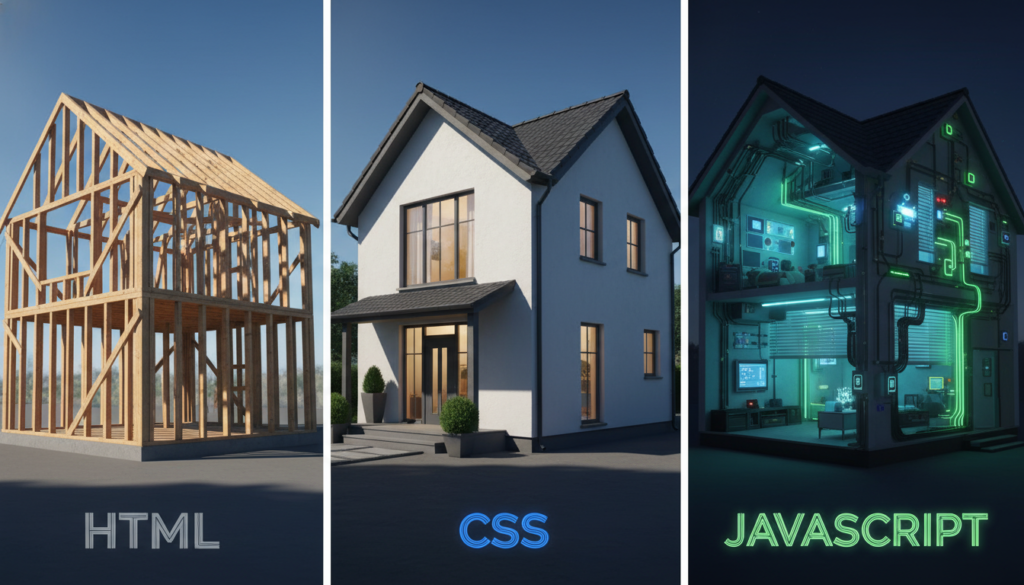
Imagine we are building a house. Before you can worry about the color of the drapes or installing a smart fridge that tweets when you run out of milk, you need a structure. You need a foundation, beams, walls, and designated spaces for rooms. This is HTML.
HTML is not a programming language. Do not let the gatekeepers on Twitter tell you otherwise to make you feel bad. It is a markup language. It is designed to tell the browser what things are. It provides the nouns of the web.
When a browser loads your site, it reads the HTML top-to-bottom. It sees a tag like <h1> and says, “Okay, this is a top-level heading.” It sees `
` and knows it is a paragraph. It sees “ and renders a clickable box. Without HTML, you have nothing. You have a blank void. It is the raw content and the structure that holds that content in place. Semantic HTML: Why It Matters Ambitious developers often make the mistake of using a generic “ tag for everything. While that works visually if you style it enough, it is like building a house entirely out of duct tape. Semantic HTML means using the right tag for the job. Use “ for the top stuff, “ for the main content, and “ for the bottom stuff. This helps search engines understand your site, which drives the kind of traffic we talk about over at https://beemytech.com/. The Skin: CSS (Cascading Style Sheets) If HTML is the drywall and 2x4s of our house, CSS is the interior designer. Without CSS, every website looks like a Word document from 1995. Times New Roman, black text, white background, and blue hyperlinks. It is functional, but it is ugly. CSS handles the presentation. It tells the browser, “Hey, take that “ tag we found earlier? Make it 48 pixels tall, color it charcoal grey, and use the Roboto font.” It controls layout, colors, spacing, and even animations. The Cascade Explained The “C” in CSS stands for Cascading, which is a fancy way of saying “hierarchy.” If you tell the browser that all paragraphs are red, but then you tell it that specific paragraphs inside a sidebar are blue, the sidebar rule wins because it is more specific. Mastering this specificity is often the hardest part for beginners. You change a line of code here, and suddenly a button three pages away moves five pixels to the left. It is a rite of passage. Modern tools have made this easier. You might see developers using utility classes or pre-processors, but under the hood, it all compiles down to raw CSS. If you want to see some truly sleek examples of modern design implementation, keep an eye on the resources we curate at https://beemytech.com/. The Muscle: JavaScript (JS) We have a house (HTML). It looks beautiful and is painted perfectly (CSS). But the lights do not turn on. The faucets do not run. The garage door does not open. It is a static model home. To make it livable, you need electricity and plumbing. You need functionality. That is JavaScript. JavaScript is the only actual “programming language” of the three. It has logic, variables, functions, loops, and math. It handles the verbs of the web. PRO TIP: A clean, isometric diagram of the browser rendering path, visualizing the flow from HTML parsing to the DOM tree, merging with CSS styles, and finally JavaScript interacting with the elements. When you click a “Submit” button and the page validates your email address without refreshing? That is JavaScript. When a map lets you drag it around? JavaScript. When Netflix automatically plays the next episode to ruin your sleep schedule? You guessed it. JavaScript. The DOM: Where the Magic Happens This is where the trinity unites. The browser takes your HTML and creates a tree-like structure in memory called the Document Object Model (DOM). JavaScript can reach into this DOM, grab an element (like a box), and change it in real-time. For example, you can write a script that says: “Listen for a click on this button. When it happens, find the box with the ID ‘content’ and change its background color to pink.” How They Render Together Understanding the sequence of events is critical for performance. Here is the play-by-play of what happens when you visit a URL: 1. The Request: Your browser sends a request to the server. 2. Parsing HTML: The browser receives the HTML file and starts reading it. It begins building the DOM. 3. Fetching Resources: As it reads the HTML, it finds links to CSS files and scripts for JS files. It pauses to go fetch them. 4. The Render Tree: The browser combines the DOM (structure) with the CSSOM (styles) to figure out where everything goes. 5. Painting: The browser actually draws the pixels on your screen. 6. Execution: JavaScript kicks in to make things interactive. If you put a massive JavaScript file right at the top of your HTML, the browser pauses everything to read it, leaving your user staring at a white screen. This is why we usually put script tags at the bottom of the body or use attributes like `defer`. It is all about perceived performance. Tools of the Trade You do not need expensive software to write this code. In fact, you could do it in Notepad, though I highly recommend against it for the sake of your sanity. Here is the standard toolkit for the ambitious web pro: The Editor: Visual Studio Code is the undisputed king right now. It is free, fast, and has a massive ecosystem of extensions. The Documentation: Never guess. The MDN Web Docs by Mozilla are the bible of web development. If you are unsure what a specific HTML tag does, look it up there. The Playground: Want to experiment without setting up files? CodePen allows you to write HTML, CSS, and JS in the browser and see the result instantly. The Browser Tools: Every modern browser has developer tools built-in. In Chrome, press F12 or right-click and select “Inspect.” You can view the console, debug JavaScript, and tweak CSS values on the fly. The Bottom Line It is easy to get lost in the hype of the latest frameworks. React, Angular, Svelte, and whatever new library released five minutes ago are all fantastic. But they are all just wrappers around these three core technologies. React generates HTML. Tailwind generates CSS. TypeScript compiles to JavaScript. If you focus on mastering the Trinity, you become framework-proof. You can learn any new tool because you understand the primitive materials it is built from. It is the difference between a cook who follows a recipe and a chef who understands flavor profiles. So, open up a text editor. Write an “ tag. Style it red. Make it alert “Hello World” when you click it. It is simple, but it is the foundation of the entire digital economy. And if you are looking for more ways to level up your tech career and stay ahead of the curve, make sure you visit https://beemytech.com/ regularly.


